2026-03-05 00:00:00 # 日志分析

ssh日志分析

一、可以登录 SSH 的账号数量

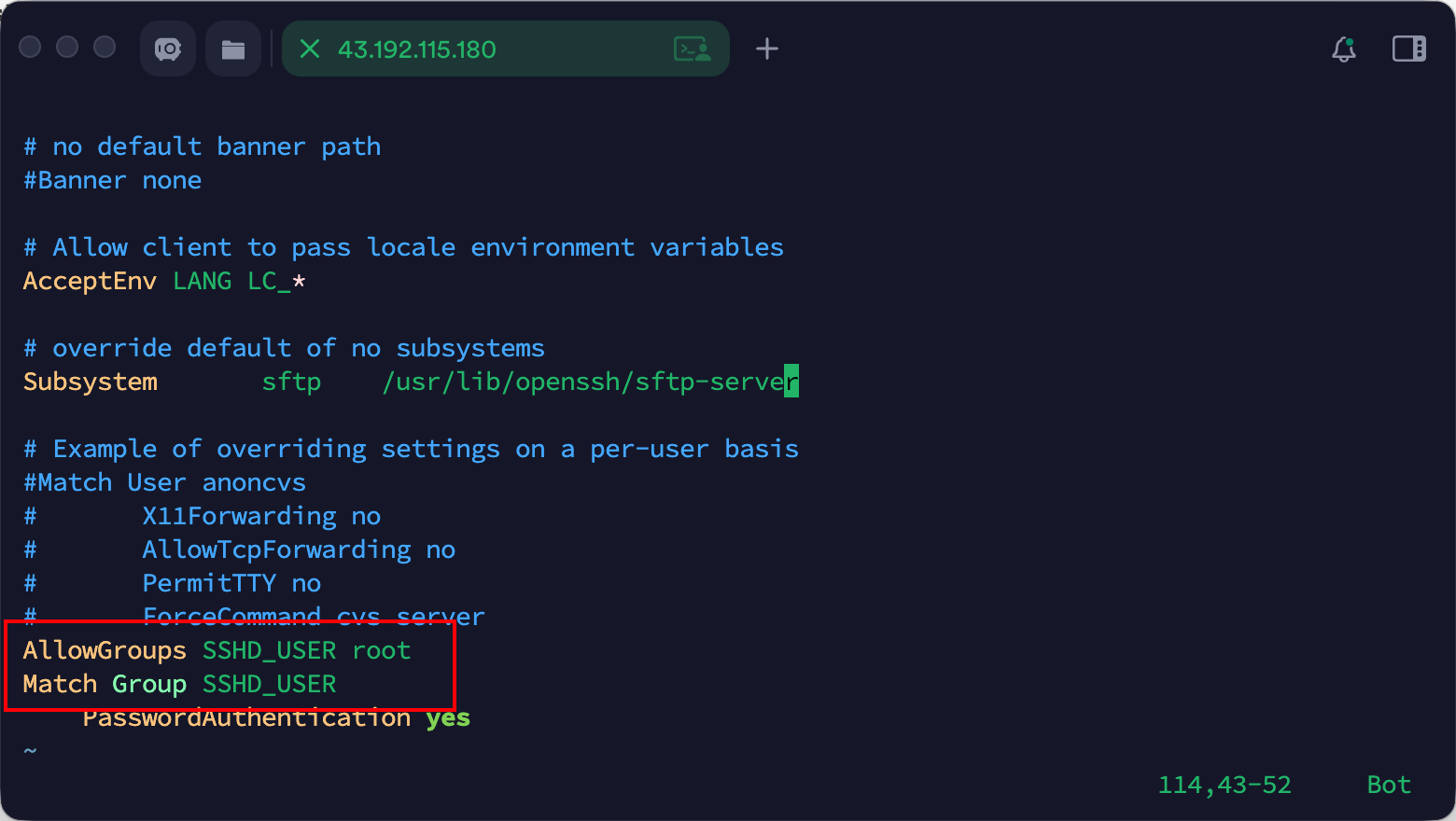
查看ssh配置文件

1
cat /etc/ssh/sshd_config 

image-20260305100405657

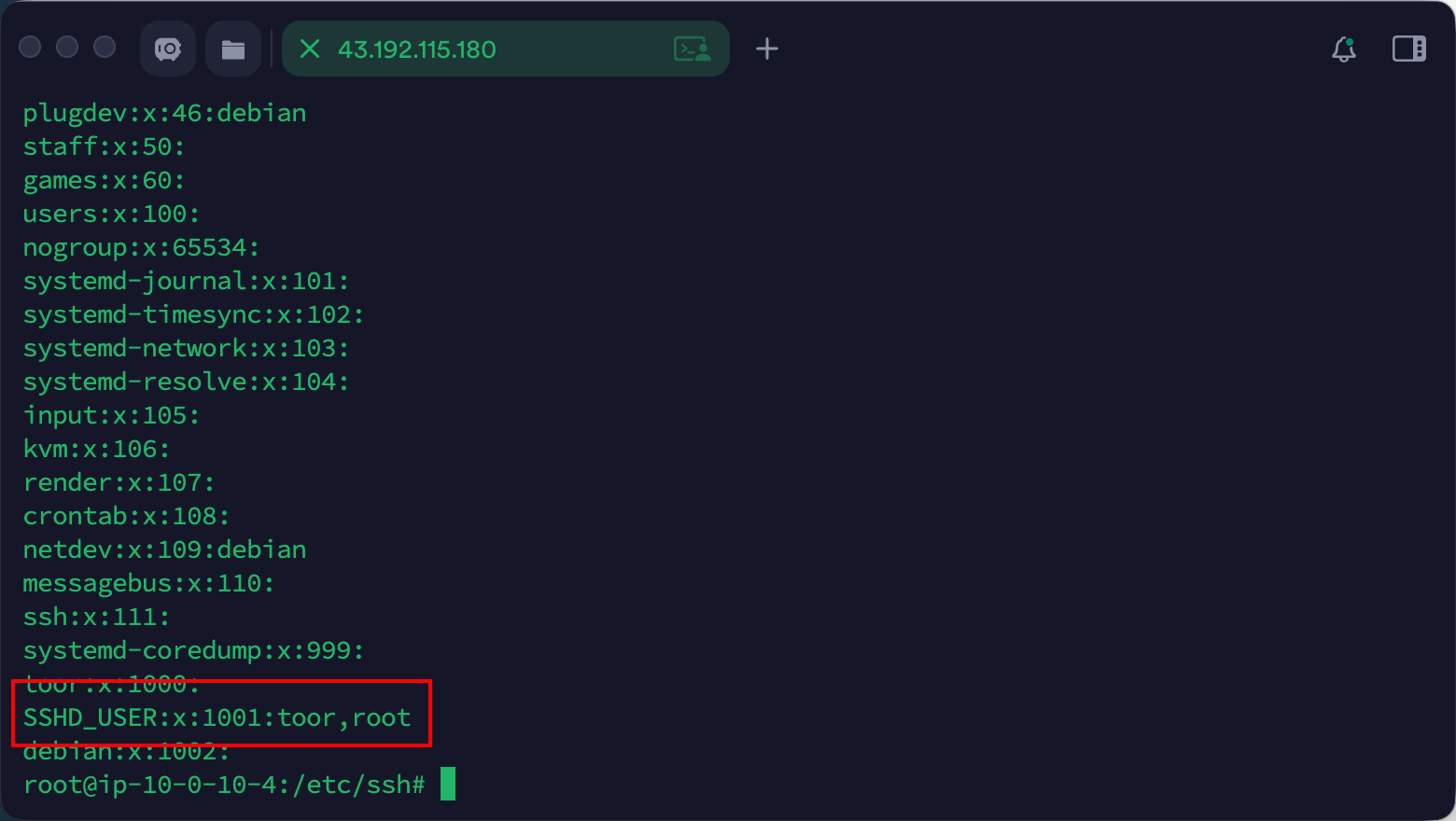
允许登录的组是SSHD_USERroot,然后查看组的用户

1
cat /etc/group

image-20260305100703244

可以看到有两个用户,一个是toor,一个是root

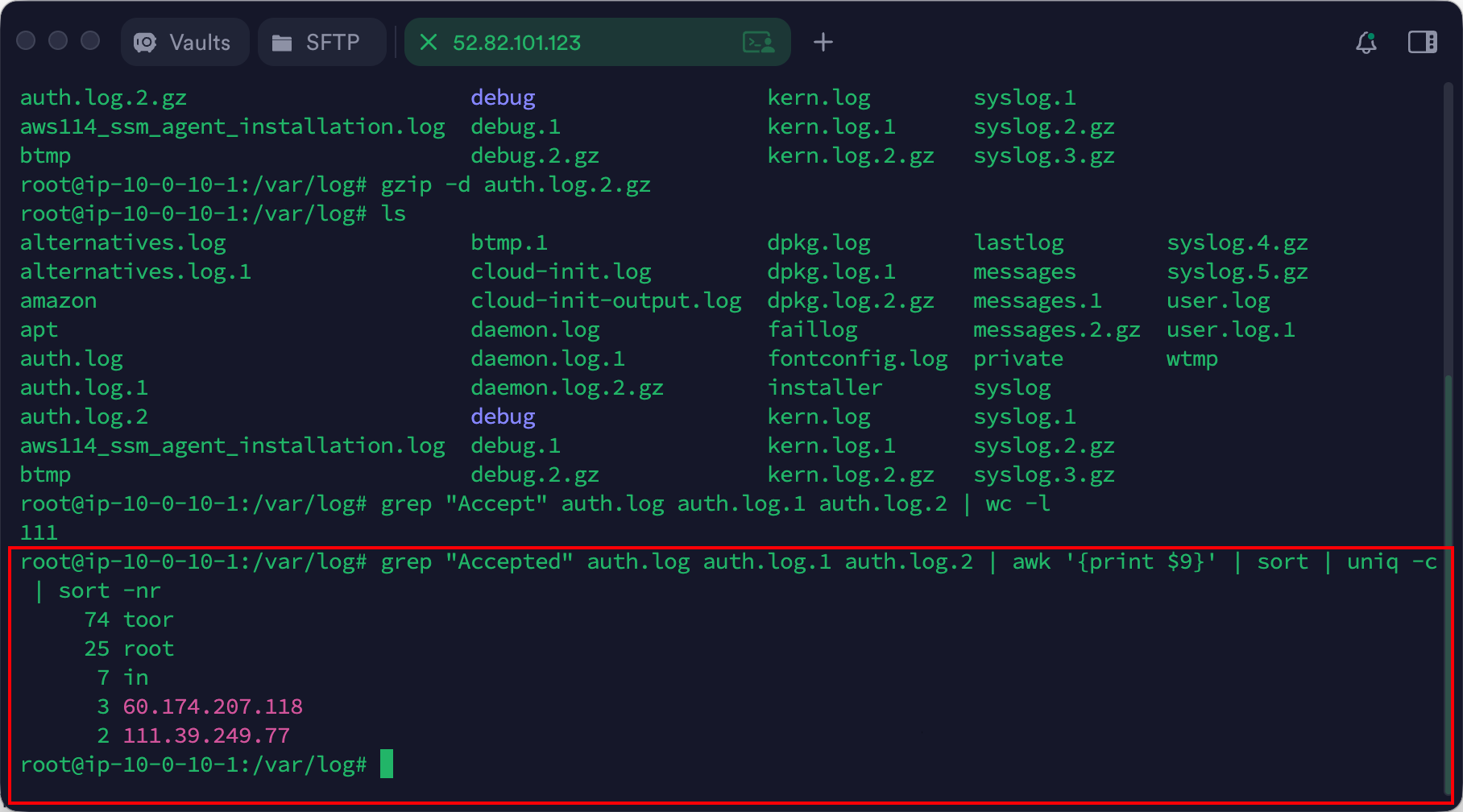
二、SSH日志中登录成功的日志条数

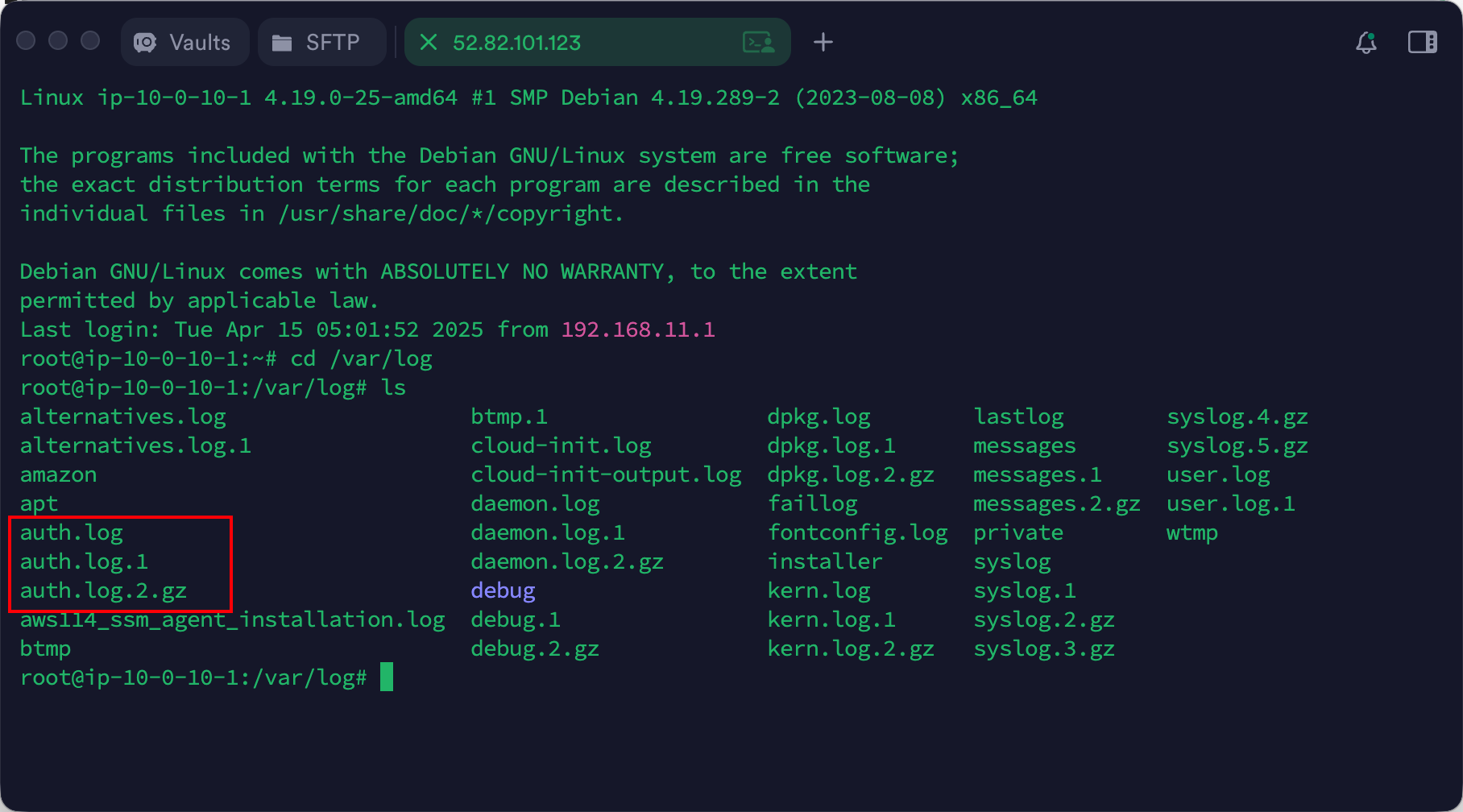
ssh日志文件路径/var/log

image-20260305102415229

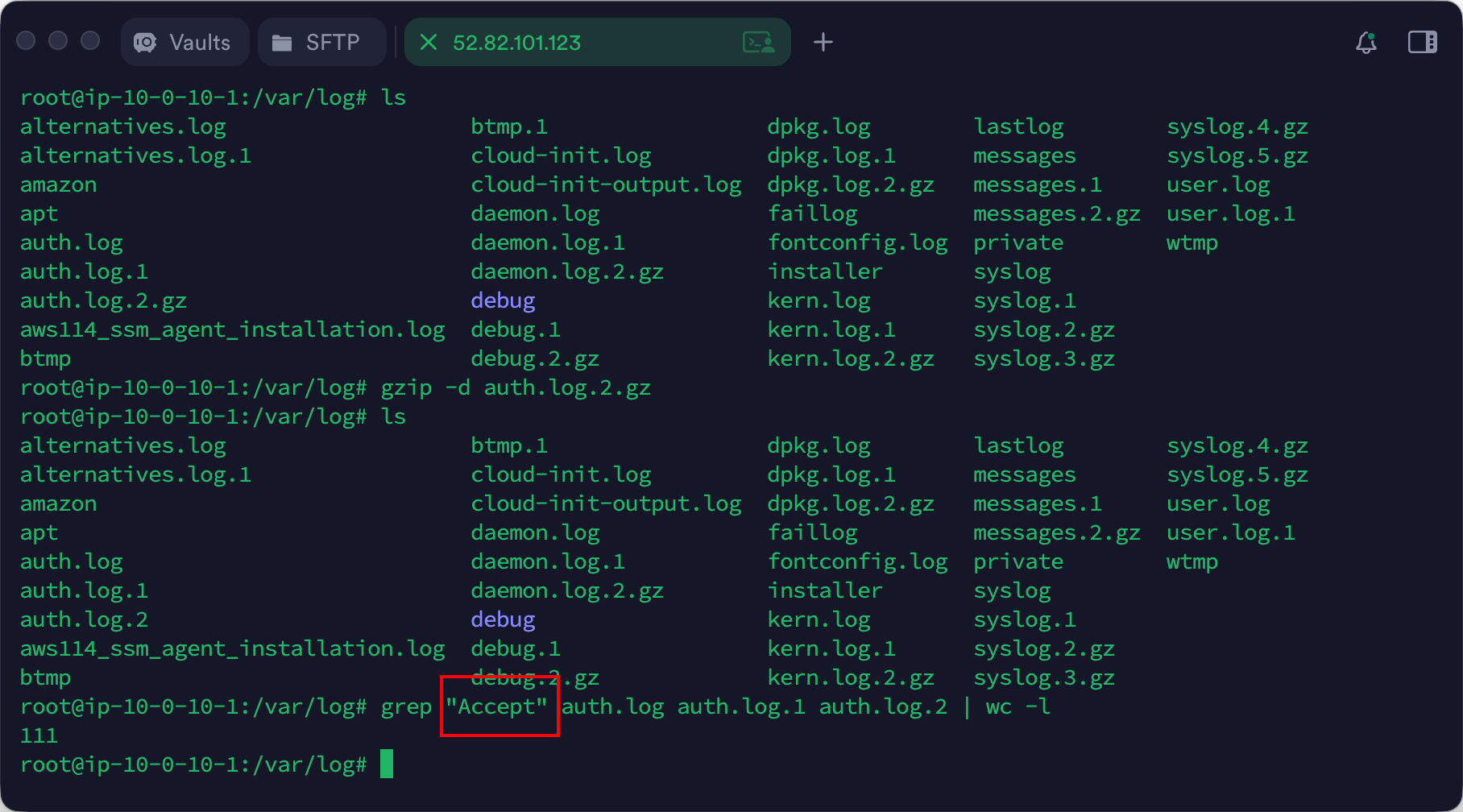
解压gzip -d auth.log.2.gz

查看日志文件内容,筛选成功的用户

1
grep "Accept" auth.log auth.log.1 auth.log.2 | wc -l

image-20260305102610290

三、登录次数最多的用户

加一个筛选

1
grep "Accepted" auth.log.1 auth.log.2 | awk '{print $9}' | sort | uniq -c | sort -nr

image-20260305102806450

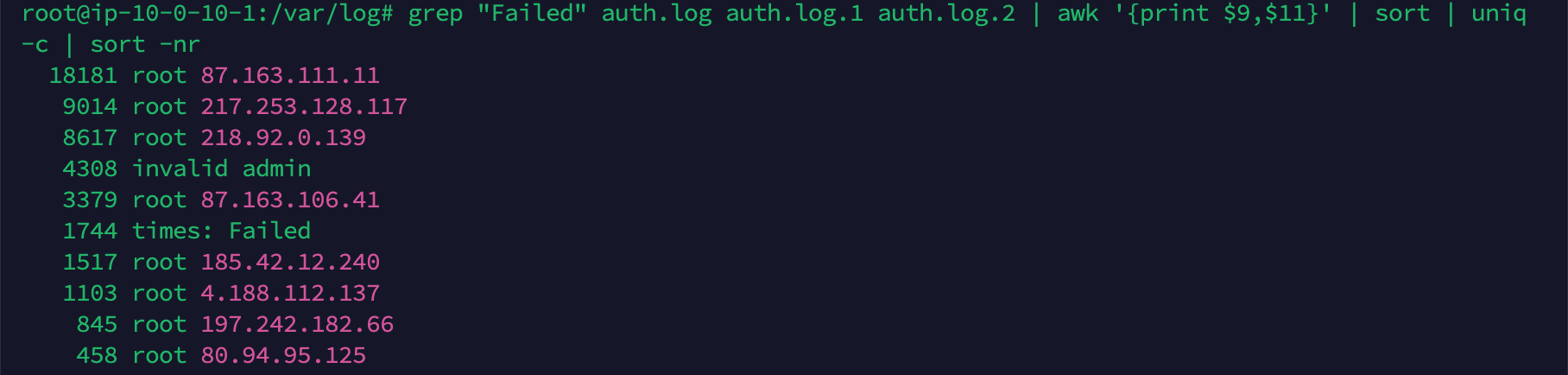
四、SSH日志中登录失败次数最多的用户以及登录使用的ip是什么

1
2
grep "Failed" auth.log auth.log.1 auth.log.2 | awk '{print $9,$11}' | sort | uniq 
-c | sort -nr

image-20260305103147378


相关分析

ssh日志常见路径

操作系统 路径
Debian / Ubuntu / Kali /var/log/auth.log
CentOS / RHEL / Rocky / AlmaLinux /var/log/secure

ssh日志的片段

1
2
3
4
5
6
7
8
9
10
11
12
13
14
15
16
17
18
Apr 14 23:17:01 debian CRON[478]: pam_unix(cron:session): session opened for user root by (uid=0)
Apr 14 23:17:01 debian CRON[478]: pam_unix(cron:session): session closed for user root
Apr 15 00:17:01 debian CRON[604]: pam_unix(cron:session): session opened for user root by (uid=0)
Apr 15 04:29:14 debian login[426]: pam_unix(login:session): session opened for user root by LOGIN(uid=0)
Apr 15 04:29:14 debian systemd-logind[403]: New session 5 of user root.
Apr 15 04:29:15 debian systemd: pam_unix(systemd-user:session): session opened for user root by (uid=0)
Apr 15 04:36:52 debian sshd[877]: Failed password for root from 192.168.11.4 port 53883 ssh2
Apr 15 04:29:16 debian login[733]: ROOT LOGIN on '/dev/tty1'
Apr 15 04:30:16 debian sshd[739]: Accepted password for root from 192.168.11.1 port 59169 ssh2
Apr 18 04:57:59 ip-172-31-35-213 sudo: pam_unix(sudo:session): session closed for user root
Apr 18 04:59:06 ip-172-31-35-213 sshd[522]: Received signal 15; terminating.
Mar 4 21:22:44 ip-10-0-10-1 passwd[456]: password for 'debian' changed by 'root'
Mar 4 21:22:44 ip-10-0-10-1 systemd-logind[465]: New seat seat0.
Mar 4 21:22:44 ip-10-0-10-1 systemd-logind[465]: Watching system buttons on /dev/input/event2 (Power Button)
Mar 4 21:22:44 ip-10-0-10-1 systemd-logind[465]: Watching system buttons on /dev/input/event3 (Sleep Button)
Mar 4 21:22:44 ip-10-0-10-1 systemd-logind[465]: Watching system buttons on /dev/input/event0 (AT Translated Set 2 keyboard)
Mar 4 21:22:44 ip-10-0-10-1 sshd[485]: Server listening on 0.0.0.0 port 222.
Mar 4 21:22:44 ip-10-0-10-1 sshd[485]: Server listening on :: port 222.

登录成功示例

1
Apr 15 04:30:16 debian sshd[739]: Accepted password for root from 192.168.11.1 port 59169 ssh2
字段 说明
Accepted password 密码认证成功
root 登录用户
192.168.11.1 登录 IP
port 59169 客户端端口
ssh2 SSH 协议版本

登录失败示例

1
Apr 15 04:36:52 debian sshd[877]: Failed password for root from 192.168.11.4 port 53883 ssh2

表示:

  • 登录失败
  • 可能是密码错误
  • 也可能是暴力破解

使用grep统计登录情况

统计失败次数

1
grep "Failed password" /var/log/auth.log | wc -l

查看登录失败的用户名和 IP

1
grep "Failed password" /var/log/auth.log | awk '{print $9,$11}' | sort | uniq -c | sort -nr

统计成功登录的用户名和 IP

1
grep "Accepted" auth.log.1 auth.log.2 | awk '{print $9,$11}' | sort | uniq -c | sort -nr

查看登录历史

1
last

输出示例

1
root pts/0 192.168.1.10 Tue Mar 5 10:00 still logged in

某一用户的爆破

1
grep "Failed password" /var/log/auth.log | grep root

脚本

1
2
3
4
5
6
7
8
9
10
11
12
13
14
15
16
17
18
19
20
21
22
23
24
25
26
27
28
29
30
31
32
33
34
35
36
37
38
39
40
41
42
43
44
45
46
47
48
49
50
51
52
53
54
55
56
57
58
59
60
61
62
63
64
65
66
67
68
69
70
71
72
73
74
75
76
77
78
79
80
81
82
83
84
85
86
87
88
89
90
91
92
93
94
95
96
97
98
99
100
101
102
103
104
105
106
107
108
109
110
111
112
113
114
115
116
117
118
119
120
121
122
123
124
125
126
127
128
129
130
131
132
133
134
135
136
137
138
139
140
141
142
143
144
145
146
147
148
149
150
151
152
153
154
155
156
157
158
159
160
161
162
163
164
165
166
167
168
169
170
171
172
173
174
175
176
177
178
179
180
181
182
183
184
185
186
187
188
189
190
191
192
193
194
195
196
197
198
199
200
201
202
203
204
205
206
207
208
209
210
211
212
213
214
215
216
217
218
219
220
221
222
223
224
225
226
227
228
229
230
231
232
233
234
235
236
237
238
#!/bin/bash

RED='\033[0;31m'
GREEN='\033[0;32m'
YELLOW='\033[1;33m'
BLUE='\033[0;34m'
NC='\033[0m'

# --------------------
detect_log() {

if [[ -f /var/log/auth.log ]]; then
BASE_LOG="/var/log/auth.log"
elif [[ -f /var/log/secure ]]; then
BASE_LOG="/var/log/secure"
else
echo "No SSH log found"
exit 1
fi

LOG_LIST=($(ls ${BASE_LOG}* 2>/dev/null))

}

# --------------------
print_header(){

echo -e "\n${BLUE}================================================================${NC}"
echo -e "${BLUE} $1${NC}"
echo -e "${BLUE}================================================================${NC}"

}

# --------------------
read_logs(){

for file in "${LOG_LIST[@]}"
do
if [[ "$file" == *.gz ]]
then
zcat "$file" 2>/dev/null
else
cat "$file" 2>/dev/null
fi
done

}

# --------------------
summary(){

print_header "SSH Security Summary"

success=$(read_logs | grep -c "Accepted")
failed=$(read_logs | grep -c "Failed password")
invalid=$(read_logs | grep -c "Invalid user")

unique_ips=$(read_logs |
grep -oE "\b([0-9]{1,3}\.){3}[0-9]{1,3}\b" |
sort -u | wc -l)

printf "%-30s : %s\n" "Logs analyzed" "${LOG_LIST[*]}"
printf "%-30s : ${GREEN}%s${NC}\n" "Successful logins" "$success"
printf "%-30s : ${RED}%s${NC}\n" "Failed logins" "$failed"
printf "%-30s : ${YELLOW}%s${NC}\n" "Invalid users" "$invalid"
printf "%-30s : %s\n" "Unique IPs" "$unique_ips"

}

# --------------------
top_failed_ip(){

print_header "Top Failed IP (with usernames)"

printf "%-10s | %-20s | %-20s\n" "Attempts" "IP" "Usernames"
echo "-----------|----------------------|----------------------"

read_logs |
grep "Failed password" |
awk '{
if ($9=="invalid"){user=$11; ip=$13}
else{user=$9; ip=$11}
print ip,user
}' |
sort |
uniq -c |
sort -nr |
head -10 |
while read count ip user
do
printf "%-10s | %-20s | %-20s\n" "$count" "$ip" "$user"
done

}

# --------------------
top_failed_users(){

print_header "Top Failed Username (with IP)"

printf "%-10s | %-20s | %-20s\n" "Attempts" "Username" "IP"
echo "-----------|----------------------|----------------------"

read_logs |
grep "Failed password" |
awk '{
if ($9=="invalid"){user=$11; ip=$13}
else{user=$9; ip=$11}
print user,ip
}' |
sort |
uniq -c |
sort -nr |
head -10 |
while read count user ip
do
printf "%-10s | %-20s | %-20s\n" "$count" "$user" "$ip"
done

}

# --------------------
successful_logins(){

print_header "Top Successful Login (User + IP)"

printf "%-10s | %-20s | %-20s\n" "Count" "User" "IP"
echo "-----------|----------------------|----------------------"

read_logs |
grep "Accepted" |
awk '{print $9,$11}' |
sort |
uniq -c |
sort -nr |
head -10 |
while read count user ip
do
printf "%-10s | %-20s | %-20s\n" "$count" "$user" "$ip"
done

}

# --------------------
bruteforce_detection(){

print_header "Potential Brute Force Attack (IP + User)"

threshold=10

printf "%-10s | %-20s | %-20s\n" "Attempts" "IP" "User"
echo "-----------|----------------------|----------------------"

read_logs |
grep "Failed password" |
awk '{
if ($9=="invalid"){user=$11; ip=$13}
else{user=$9; ip=$11}
print ip,user
}' |
sort |
uniq -c |
sort -nr |
awk -v t=$threshold '$1>t {printf "%-10s | %-20s | %-20s\n",$1,$2,$3}'

}

# --------------------
hourly_activity(){

print_header "Login Attempts by Hour"

printf "%-10s | %-10s\n" "Hour" "Attempts"
echo "-----------|----------------"

read_logs |
grep -E "Accepted|Failed password" |
awk '{print $3}' |
cut -d: -f1 |
sort |
uniq -c |
while read count hour
do

bar=$(printf "%${count}s" | tr ' ' '#')

if [ ${#bar} -gt 40 ]
then
bar="${bar:0:40}"
fi

printf "%-10s | %-5s %s\n" "$hour:00" "$count" "$bar"

done

}

# -------------------
recent_activity(){

print_header "Recent SSH Activity"

read_logs |
grep -E "Accepted|Failed|Invalid" |
tail -10 |
while read line
do

if echo "$line" | grep -q "Accepted"
then
echo -e "${GREEN}[SUCCESS]${NC} $line"

elif echo "$line" | grep -q "Failed"
then
echo -e "${RED}[FAILED]${NC} $line"

else
echo -e "${YELLOW}[INVALID]${NC} $line"

fi

done

}

# --------------------

detect_log

summary
top_failed_ip
top_failed_users
successful_logins
bruteforce_detection
hourly_activity
recent_activity

echo -e "\n${GREEN}SSH Audit Completed.${NC}\n"
上一页
2026-03-05 00:00:00 # 日志分析